How to set up a home office in your Bali villa
You booked the villa for the pool and the rice-field view. Then Monday came, you opened the laptop on the dining table, and by Wednesday your neck hurt and your Zoom camera showed a silhouette against a very bright window. Here's what actually goes wrong in a villa office, roughly in the order it goes wrong. Most of the fixes cost nothing. The ones that don't can be delivered to your villa today.
Prices checked September 2026 at about Rp 17,600 to the dollar.
The table is the wrong height, and it's always the wrong height
Villa dining tables are about 75 cm and built for eating. Kitchen islands are 90 cm and built for standing. Neither is right for typing. A keyboard wants to sit at roughly elbow height with your shoulders relaxed, which for most adults is 65 to 75 cm sitting and 95 to 115 cm standing — measure your own elbow rather than trusting the average. Two centimetres out and you shrug all day without noticing, and that's the shoulder tension you've been blaming on work.
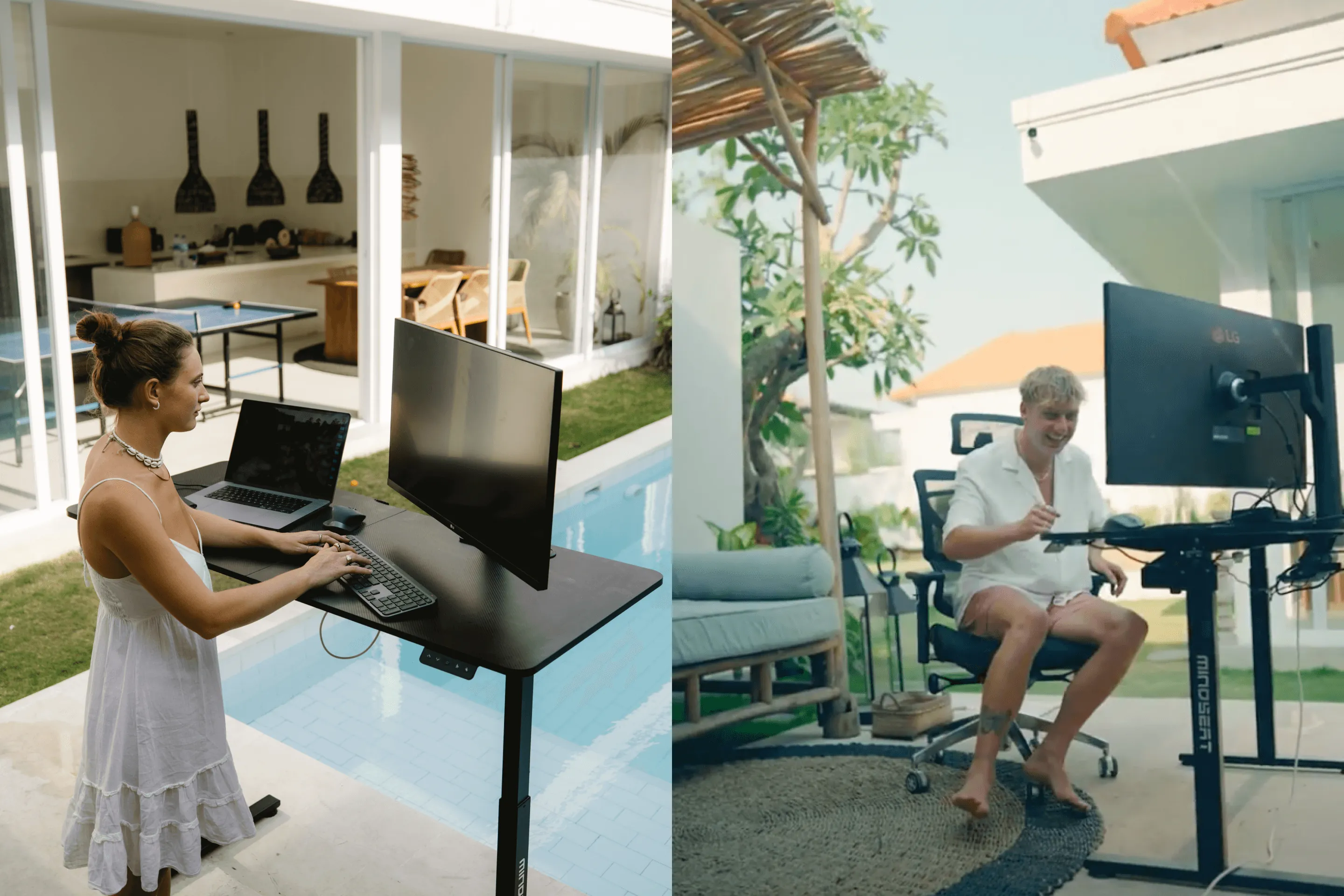
You've got three options. Put a cushion on the chair and a box under the laptop, which works for a week. Buy a desk: a single-motor electric one runs $142 to $227 (Rp 2.5 to 4 million) at IKEA or on Tokopedia, a dual-motor one $455 and up, and either becomes a problem the week you fly out. Or rent a height-adjustable desk for $50 a month, 140 × 60 cm, 73 to 118 cm, one button. The point isn't the standing. The point is that it goes to your sitting height, and then up again after lunch when the slump arrives.
The chair is a dining chair
This is where the back pain comes from. Wicker, rattan and dining chairs have no lumbar support and no adjustable arms, and the padded ones are hot by ten in the morning. Everyone who stays more than three weeks either finds a proper chair or finds a physio. An ergonomic mesh chair is $70 a month, and the mesh matters more here than anywhere you've worked before, because the humidity doesn't care how good your posture is. Taken together with the desk, The Essential is $99 a month for both.
A laptop screen is a phone screen with a keyboard
Thirteen inches at arm's length is fine for email. It isn't fine for a spreadsheet beside a browser, code beside a terminal, or a design file beside the brief. The people who add a screen all say the same thing afterwards: they stopped alt-tabbing and their day got shorter.
A 32-inch 4K is the one to take if you work in video, photo or anything with a timeline, and it's the screen that makes a villa desk better than any office you've had. The 27-inch QHD suits most people and most desks; the 24-inch is the one to pick when the desk is shallow or the screen is mainly for mail and chat, at $40 a month. All of them connect to a MacBook with one USB-C cable that also charges it, and all of them rise to eye level, which fixes the neck problem from the dining table for free. The monitor rental page has the full comparison.
Put the laptop on a laptop stand beside the monitor and you've got two screens at the same height, which is the setup most people actually want.
Power: one socket, everything on it
Bali villas run on 230 V, 50 Hz, with the two-round-pin plug. Bring one good adapter rather than four cheap ones. Cuts are usually short, minutes to an hour or two, and more frequent in the November to March wet season and outside the main tourist zones; the rare island-wide blackout does happen, as it did in May 2025 and February 2026. Save often and keep the laptop charged rather than running it flat on the desk. Our desk ships with an extension cord, because there's never a socket where the desk wants to be.
Wi-Fi: test it before you unpack
Run a speed test from the room you'll actually work in, not from the pool. Fifteen megabits down and five up carries HD group calls, and a stable upload matters more than the headline number. Below that you want a local SIM as backup: Telkomsel has the widest coverage outside the south, XL is stronger in the south, and past 90 days you'll need to register your phone's IMEI with customs or the SIM stops working.
By area, Canggu and Seminyak are reliable, Ubud is fine in town and patchy in the rice fields, and on the east coast it comes down to the individual villa, so ask for a speed test before booking. The area comparison goes through it area by area.
Heat and light
Work in the room with the air conditioner, not the open-plan living area. You'll get more done and the laptop fan will thank you. Face the window rather than sitting with your back to it, or your camera shows a silhouette. If the only place the desk fits has the window behind you, a wide-lens webcam handles low light far better than the built-in one, and a lamp helps too.
The two things nobody warns you about
You'll move villa. Almost everyone does, at least once, and every piece of kit you bought becomes a problem in the back of a Grab. Everything you rent from us moves free once a month, and the driver has been known to take the suitcases too.
And you'll take calls at eleven at night. If your team is in Europe or the US, the evening is your overlap. Stand for those calls: the desk at standing height and the camera at eye level make you look awake when you aren't. The time-management post covers keeping those evenings from eating the next morning.
The one-afternoon checklist
- Pick the air-conditioned room. Run a speed test in it.
- Order the desk and chair, or the full package with a monitor. Delivery is same-day, so order in the morning.
- Set the desk to your sitting height, note the number, then set a standing height.
- Laptop on a stand, monitor at eye level, camera facing the window.
- Do the five desk exercises once so you remember they exist.
A villa is a wonderful place to spend six months. It's just that it was furnished for a holiday and you're not on one, and no café or coworking membership fixes the eleven hours a day you spend inside it.
That part is ours. A height-adjustable desk at $50 a month, an ergonomic chair at $70, a 32-inch 4K monitor at $160, or all three as The Best at $345. We deliver the same day, set it up, and move it for free when you change villa.